BRAKE CONTROL / DYNAMIC CONTROL SYSTEMS ANTI-LOCK BRAKE SYSTEM DTC CHECK / CLEAR
DTC CHECK/CLEAR (When Using GTS)
Check for DTCs.
Turn the ignition switch off.
Connect the GTS to the DLC3.
Turn the ignition switch to ON.
Turn the GTS on.
Read the DTCs following the prompts on the GTS. Enter the following menus: Chassis / ABS/VSC/TRC / Trouble Codes.
- Chassis > ABS/VSC/TRC > Trouble Codes
- 50001 105
Check the details of the DTCs.
Click hereBrake>BRAKE CONTROL / DYNAMIC CONTROL SYSTEMS>ANTI-LOCK BRAKE SYSTEM>DIAGNOSTIC TROUBLE CODE CHART
Clear the DTCs.
Turn the ignition switch off.
Connect the GTS to the DLC3.
Turn the ignition switch to ON.
Turn the GTS on.
Operate the GTS to clear the codes. Enter the following menus: Chassis / ABS/VSC/TRC / Trouble Codes.
- Chassis > ABS/VSC/TRC > Clear DTCs
- 50002 105
Press the DTC clear button.
DTC CHECK/CLEAR (When Using SST Check Wire)
Check for DTCs.
Turn the ignition switch off.
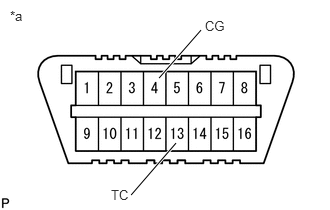
| *a | Front view of DLC3 |
Using SST, connect terminals TC and CG of the DLC3.
- SST
- 09843-18040
Turn the ignition switch to ON.
Observe the blinking pattern of the ABS warning light in order to identify the DTC.
- HINT:
-
If the ABS warning light does not blink, inspect the TC and CG terminal circuit, and ABS warning light circuit.
| Trouble Area | See procedure |
|---|---|
| TC and CG terminal circuit | ( ) )
|
| ABS warning light circuit (Remains on) | ()
|
| ABS warning light circuit (Does not come on) | ()
|
Count the number of blinks of the ABS warning light.
- HINT:
- ·
How to read DTCs:
Diagnostic trouble codes are represented by the number of blinks of a warning light. For example, code 21 would be shown by 2 blinks, a pause of 1.5 seconds, and then 1 blink.
·If one code is detected:
The light repeats the same code after a pause of 4 seconds.
·If multiple codes are detected:
The light outputs one code after another with a 2.5-second pause between each code.
When all codes have been output, there is a 4-second pause and then the light begins to output the codes again.
Check the details of the DTCs.
- ABS DTC:
ABS Warning Light Display Tester Display 11 C146E 12 C146F 13 C146C 14 C146D 21 C1468 22 C1469 23 C146A 24 C146B 31 C1401 C1405 32 C1402 C1406 33 C1403 C1407 34 C1404 C1408 35 C1413 36 C1414 38 C1415 39 C1416 41 C1241 C1417 49 C1425 51 C1427 C1428 94 U0073
After completing the check, disconnect terminals TC and CG of the DLC3 to turn off the display.
If 2 or more DTCs are detected at the same time, the DTCs will be displayed in ascending order.
Clear the DTCs.
Turn the ignition switch off.
| *a | Front view of DLC3 |
Using SST, connect terminals TC and CG of the DLC3.
- SST
- 09843-18040
Turn the ignition switch to ON.
Clear the DTCs stored in the ECU by depressing the brake pedal 8 times or more within 5 seconds.
Check that the ABS warning light indicates the normal system code.
Remove SST from the terminals of the DLC3.
- HINT:
-
The DTCs cannot be cleared by disconnecting the battery terminal or the ECU-IG NO. 1 fuse.
END OF DTC CHECK/CLEAR
Turn the ignition switch to ON.
Check that the ABS warning light goes off within approximately 3 seconds of turning the ignition switch to ON.