DOOR LOCK WIRELESS DOOR LOCK CONTROL SYSTEM(w/ Smart Entry and Start System) DIAGNOSIS SYSTEM
DESCRIPTION
The certification ECU (smart key ECU assembly) stores DTCs when malfunctions occur.
The diagnostic system allows for reading of the DTCs from the DLC3.
Use the GTS to check for malfunctions and perform repairs.
CHECK DLC3
Check the DLC3.
Click hereGeneral>INTRODUCTION>HOW TO USE THIS MANUAL>GENERAL INFORMATION
INSPECT BATTERY VOLTAGE
Measure the vehicle battery voltage.
- Standard Voltage:
11 to 14 V
If the voltage is below 11 V, recharge or replace the battery.
SELF-DIAGNOSTIC MODE (USING GTS)
Connect the GTS to the DLC3.
Turn the engine switch on (IG).
Turn the GTS on.
Enter the following menus: Body Electrical / Entry&Start / Utility / Wireless Door Lock Diagnosis Mode.
- Body Electrical > Entry&Start > Utility
-
Tester Display Wireless Door Lock Diagnosis Mode - 50005 125 2164
Proceed to the next step in accordance with the prompts on the GTS screen.
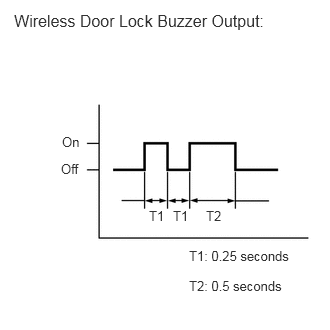
Check that the system has switched to self-diagnostic mode by checking the wireless door lock buzzer output pattern.
Check the diagnostic outputs when an electrical key transmitter sub-assembly switch is pressed. The diagnostic outputs can be checked by the wireless door lock buzzer output pattern.
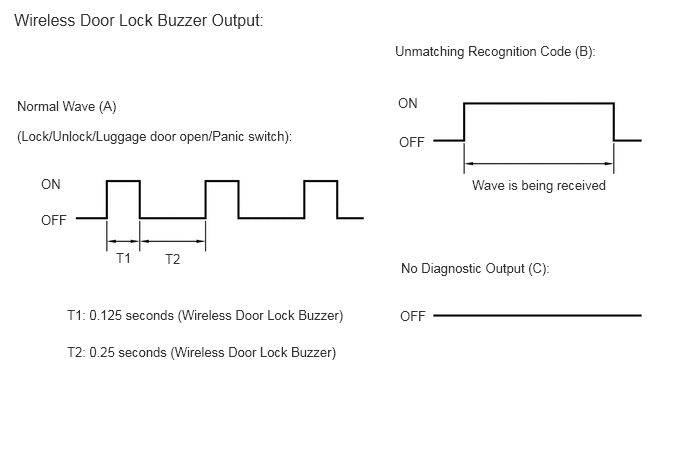
| Interior Light Output | Suspected Area |
|---|---|
| A | Normal (No malfunction) |
| B | Register wireless code |
| C | Wave interference or malfunction of a related component |